

As we posted, the Dev Team has produced RedSn0w 0.9.14b1 today. The updated edition of the most-known iPhone jailbreak software features the very-expected ability to downgrade 6.15.00 to 5.13.04 baseband for iPhone 3G / 3GS.
Users with unlocked 3G / 3GS iPhones stuck on 06.15.00 ipad baseband are now able to downgrade to 05.13.04 baseband.

If their iPhone's baseband will be downgraded that mean that their GPS will be restored and their device with downgraded baseband will be supported with Ultrasn0w 1.2.7.
![]() |
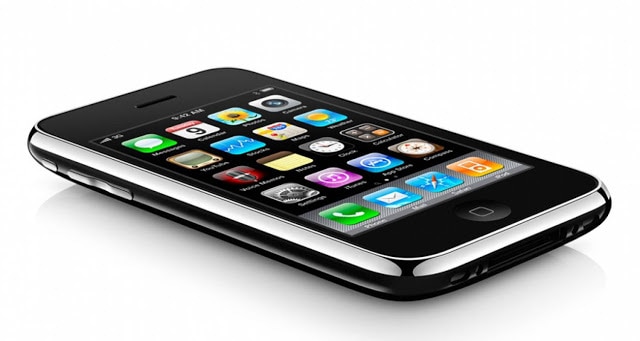
| iPhone 3GS |
iPhone Dev Team's release information:
"The iPhone Dev Team is happy to announce a baseband downgrade option in redsn0w for those who are using the iPad's o6.15 baseband on the iPhone3G or iPhone 3GS.
Typically you'd have the 06.15 baseband if you unlock with ultrasn0w but updated your iPhone baseband past 05.13.04. With this new capability, you can now downgrade specifically from 06.15 to 05.13.04 (even if you never had 05.13.04 on that device before). This gives you the best of both worlds: ultrasn0w compatibility and a normal iPhone baseband with full GPS and the ability to use stock IPSWs again.
Here are the steps:
Step 1. Use the "Extras=>Select IPSW" button in redsn0w to tell it which firmware version you have installed (new-bootrom 3GS users can usually skip this step but it doesn't hurt for them to do it too).
Step 2. Do a controlled shutdown of your iPhone ("slide to power off"). This step is very important to avoid mount problems when the ramdisk is running!
Step 3. Go back to the first screen and click "Jailbreak". Enable the "Downgrade from iPad baseband" checkbox, disable Cydia if you already have it installed, and click Next to proceed through the normal DFU ramdisk steps. After the ramdisk gets launched and you see the Pwnapple running on your iPhone, you'll eventually get to the "Flashing Baseband" step.
THIS STEP TAKES A VERY LONG TIME to complete and there won't be any feedback while it's running. Please just let it be for the next 3-8 minutes! When the ramdisk has done its job it will reboot the phone on its own. For those who are wondering if you can update your 3G or 3GS to 06.15 solely for the purposes of downgrading to 05.13.04, the answer is "yes" for 3G owners, and "maybe" for 3GS owners. The iPad is not compatible with 3GS units manufactured week 34 of 2011 or later. If you have an iPhone 3GS and if digits 3-5 of its Serial Number are 134 or later (xx134…), then you should NOT try to install the 06.15 baseband on your 3GS! It will brick your radio, preventing both the downgrade from working and normal iPhone software from using it as a phone! Be warned!"
How to Downgrade Baseband 06.15.00 to 05.13.04 With Redsnow
Step 1: Download Latest Redsn0w.
Step 2: Start Redsn0w.
Step 3: Connect your iPhone to the Computer and Put it into DFU mode.
Step 4: Now click "Jailbreak", Select "Downgrade from iPad baseband", unselect Cydia in the event that you previously have installed it, Now click Next, and wait right up until you view the "Flashing Baseband" message.
Keep refresing UnlockBoot for more, soon we will post a video guide on how to downgrade baseband 6.15.00 to 5.13.04 using Redsn0w. For anyone who definitely are ready to begin, you can download Redsnow 0.9.14b1 from our Downloads section.
Any thoughts? — Hit the Comment section below!











6 comments:
Is it possible to downgrade 06.15 to 05.13 on ios 6.0? Pleeeeease, answer)
2/13/2013
I confirm that this works!!! It's a very long process but it does work for a updated 3GS on 6.1
***If you cant Activate phone after updating to 6.1, you'll first need to do the following:
- Hacktivate with Redsnow 0.9.14b3 and downgrade iPad Baseband like above, which will allow you to activate your iphone with a Tethered Jailbreak,
- Then restart Redsnow "must pick ISPW" and do a "Just Boot" then jailbreak until you get Cydia (you will have to this step if you cant get into Cydia because it is tethered jailbreak),
- in Cydia install "Evasi0n 6.1 Untether" (once installed properly the iphone will be untethered and no longer need Redsn0w.)
- in Cydia install "Ultrasn0w". You should do a "Complete Update" in Cydia when ever available. Enjoy! You have now unlocked your iPhone to use sim card.
i have a 3G iphone stuck on BB 06.15.00 running whited00r iOS 4.2, but in actuality its running iOS 3.1.3 and i'd like to know if i'd be able to use this downgrade method as well...thank you for your help in advance....
my mobile is always stuck on the downloading jailbreaking data and it doesn't proceed to the flashing !! i'm connected to wifi...... please help
stuck at fetching baseband files
I have 3Gs with New Bootrom but manufactured before 2011. I
had accidently updated iPhone from iTunes to 6.1.3. That upgraded my baseband
to 05.16.08 and left me with a locked phone.
This is what I did. You
can do the same eve if you have old Bootrom (that is in fact a boon since you’ll
get untethered jailbreak of 6.1.3). But if your phone in manufactured in 2011
(exact date please Google it), then DONOT
ATTEMPT THIS.
1-
Thumb Rule: Make sure your internet connectivity
is present throughout. Make sure of the versions of software mentioned. Make
Sure you have shsh blobs of 6.1.3 present (in case you want to go to 6.1.3 in
step6). Run all tools as “run as administrator” on windows.
2-
Download iOS 4.1. Download Latest TinyUmbrella. Download
latest iREB. Put your iPhone in Pwned DFU mode via iREB (Dark screen with no
logo). Start TinyUmbrella TSS Server and use iTunes 11 to flash stock 4.1 onto
iPhone (hold shift key while selecting restore from iTunes and select 4.1 iOS).
Now your Phone is on iOS 4.1 and Baseband 05.16.08, since baseband cannot
downgrade via iTunes.
3-
Jailbreak using Redsn0w V0.9.14 b2– Select
option Install Cydia and Install iPad Baseband. Now your Phone is on iOS 4.1
and Baseband 6.15.00. (May require couple of retries. If putting DFU mode from
Cydia doesn’t work, try putting it in DFU mode through iREB)
4-
Once Jailbroken, run Redsn0w0.9.15b1 –
select ios4.1 from extras and deselect Install Cydia and select downgrade from iPad
baseband. Now your Phone is on iOS 4.1 and Baseband 5.13.04. (May require
couple of retries. If putting DFU mode from Cydia doesn’t work, try putting it
in DFU mode through iREB)
5-
Now you have a working iPhone 3gs on iOS 4.1
untethered and you can unlock it from Ultrasn0w. Proceed below only if you are
willing to risk a tethered jailbreak for 6.1.3 J
6-
Download iOS 6.0.0 and 6.1.3 for 3gs. Download sn0wbreeze v2.9.14.
7-
Start TinyUmbrella TSS server. Prepare Custom
ipsw through Sn0wbreeze with option iFaith. When it asks for 6.1.3 appticket,
pass on shsh blobs for 6.1.3 (This mode will preserve baseband too, so don’t worry).
Sn0wbreeze will prepare the ROM (takes some time). At the end of it, it asks
you to put your phone in DFU. Don’t use that. Close the Sn0wbreeze and use
latest iREB to put phone in Pwned DFU mode.
8-
Start iTunes. Use shift restore and select ipsw
built by Sn0wbreeze. When restore is complete and it reboots, press home+power
key to force shutdown and reboot using the iBooty tool created by Sn0wbreeze in
Step 7 which is now placed on your desktop.
9-
Now run Redsn0w0.9.15b1, select ipsw in
extra as 6.0.0 (not 6.1.3!!). Click on jailbreak and install Cydia option. (May
require couple of retries. If putting DFU mode from Cydia doesn’t work, try
putting it in DFU mode through iREB). Whenever the phone is booted, don’t boot
from Redsn0w’s ‘just boot’ option. Always use iBooty. If it starts booting in
between, force shutdown from home+power and start with iBooty.
10-
Now you should have a 3Gs on iOS 6.1.3, which is
Jailbroken (tethered in case of New Bootrom) and fully unlockable through
Ultras0W at baseband 5.13.04. You’ll have to use iBooty every time you iPhone
restarts.
Post a Comment