Factory Unlock iPhone 4 / iPhone 5 iOS 6.1.2 / 6.1.3

Unlock iPhone 4S via Ultrasn0w Status [Progress]

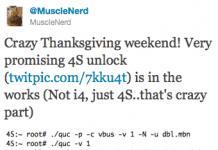
Ultrasn0w Unlock iPhone 4SHow to Unlock iPhone 4S ? Many of our readers are asking about Ultrasn0w update for iPhone 4S. So in this post you will find all you need to know about iPhone 4S unlock.

As most of you know that iPhone Dev-team is the only involved team that working on iPhone 4S unlock expilot.

This month iPhone Dev-team, Chronic Dev-team and Pod2g were very busy to finish the shinny iPhone 4S and Pad 2 untethered 5.0.1 jailbreak. Now - iPhone Dev-team has nothing to do except iPhone 4S unlock.

Corona 5.0.1 Jailbreak Updated to V1.0-8

Corona 5.0.1 Jailbreak Updated to V1.0-8
Jailbreak iOs 5.0.1? Finnaly we have Corona V1.0-8  - with iBoox fixes!

The Corona v1.0-7 failed to work on the iPhone 4S running iOS 5, so it has been updated to V1.0-8 with fix for this problem.

Saurik informs us that All jailbroken iOS users should install this updated ( iPhone 4S / iPad 2 users included ) except “old bootrom” iPhone 3GS users.

RedSn0w 0.9.10b5 Released With iBooks DRM Fix

Download Redsn0w 0.9.10b5
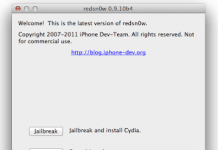
The iPhone Dev-Team has updated RedSn0w 0.9.10b5 which includes another fix for iBooks by planetbeing.

The new redsn0w version b5 incorporates yet another fix for iBooks, this time involving DRM. @planetbeing wrote a utility called "crazeles" that overcomes jailbreak detection by iBooks that would cause about 10% of images to show incorrectly.

How To Install Siri on iPad 2 [Complete Guide]

How To Install Siri on iPad 2Follow This Tutorial and Install Siri on iPad 2:
Step 1: Jailbreak your iPad 2 on 5.0.1 – complete guide here.

Step 2: Open “Cydia” + “Search” and search for “Spire” and install “Spire” on your iPad 2.

Install Siri Without Proxy on iPhone 4 / iPod touch 4G [VIDEO]

Install Siri Without Proxy on iPhone 4 / iPod touch 4GHow to install Siri on iPhone 4 / ipod touch 4G ?

Now we have new way who allows you to install Siri Without proxy this great news is according JBN this method is available for the jailbroken iPhone 4 and  iPod touch 4G only.

After two weeks we post another way to get Siri on iPod Touch From iPhone 4S Backup.

Use Siri to Translate More Than 35 Languages

Use Siri to Translate Languages Using Siri to Translate Languages ? With every day passing we have new Cydia tweaks.

Now we have another amazing siri tweak - siri can translate more than 35 languages using siri.

Of course you need to have your iPhone 4s jailbroken on iOS 5.0.x and AssistantExtensions installed.

Jailbreak IPhone 4S & iPad 2 5.0.1 Untethered - Greenpois0n Absinthe

Jailbreak IPhone 4S / iPad 2 5.0.1 Untethered with Greenpois0n Absinthe
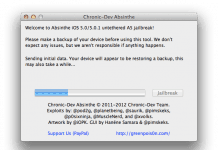
Jailbreak iPhone 4S & iPad 2 5.0.1 untethered has been released finally. The Chronic Dev team with the help of Pod2g and MusclNerd of iPhone Dev team, has released Greenpois0n Absinthe untethered jailbreak 5.0.1 iPhone 4S &iPad 2.

Absinthe Untethered Jailbreak support devices :

  • iPhone 4S running iOS 5.0, 5.0.1 (9A405 and 9A406)
  • iPad 2 Wifi/GSM/CDMA running iOS 5.0.1

04.11.08 Baseband Will Be Unlocked With Gevey Sim 2

unlock 04.11.08 baseband with gevey sim 2How to Unlock iPhone 4 04.11.08 Baseband? Jailbreak iOS 5.0.1 for iPHONE 4S, 4, 3GS, iPad 2, untethered has been released finally.

The Chronic Dev Team with the help of Pod2g and MuscleNerd of iPhone Dev team, has released. The Next level of hacking is unlock.

ApplenBerry again confirmed that a new Gevey SIM will unlock iPhone 4 baseband 04.11.08.

Unlock 04.11.08 Baseband with new Gevey Sim [Confirmed]

Gevey sim 4.11.08 Unlock

Finally ApplenBerry confirmed that a new Gevey SIM will unlock iPhone 4 baseband 04.11.08.

It was announced today by ApplenBerry via their Facebook fan page. So get ready folks your expensive iPod touch (with 4.11.08 BB) soon will be converted to your usable iPhone :).

All UnlockBoot's followers are happy with this news, that a new Gevey SIM will unlock 04.11.08 baseband.

BlackBerry Messenger on iPhone and Android Coming soon ?

BlackBerry Messenger on iPhone and AndroidBlackBerry Messenger is a most famous chat application for Blackberry devices. This Messenger is one of the main reasons for buying this device, to this day can not connect an iPhone directly to this application and create communications media.
The WhatsApp Messenger can connect an Iphone and Blackberry, but the Blackberry Messenger application needs.


WhatsApp now RIM Blackberry Company is considering creating iOS Messenger for BlackBerry and Android. The android is the Major Smartphone Platform with many Hardware companies while Apple is in the line of Smartphones.
BlackBerry Messenger on iPhone and Android

You are BlackBerry user -- want to port messenger to Apple, than we have good news for you. RIM’s new CEO Thorsten Heins said that RIM might release BBM to other platforms. In a interview to a very famous BlackBerry weblog, Crackberry, he said that:
We’re constantly exploring our room to maneuver and our room to explore other businesses so I wouldn’t say categorically no to it,” Heins explained. “There is a time where this might make sense, and I have a team looking into this… I’m open for licensing if it makes sense.”
With the release of other messengers, RIM does will probably not get many users back to its platform. Follow UnlockBoot and be first with BlackBerry Messenger on iPhone and Android !

i4Siri Server Almost Ready for Beta! [VIDEO]

i4Siri Server In this demo video we completely keyless environment that connects to google for processing of siri commands. Siri dictation works flawlessly.

As of right now we have not programmed all the commands yet but you can see from this video that it proves this is a google processing server and not apples.


We plan to release a i4Siri package in the main repositories on Cydia that will add on to Spire. This means it will automatically add the server address. From there you will need to go to our client page and signup for an account. The account will allow you to add different UDID numbers for different devices and download the certificate to connect through ssl to our server.

i4Siri can also work on 3G. Spire works on all network interfaces so therefore our server will work as well. The 3GS is supported as well as the iPad 2, iPhone 4, and iPod Touch 4G.
See the Demo Video

We hope that soon we have "Siri" alternative on our iDevices.

Waiting For 04.11.08 Unlock - Don't Update To iOS 5.1

04.11.08 Unlock - Don't Update To iOS 5.1
How to unlock 04.11.08 baseband ? When Apple seeded a  pre-release build of their upcoming iOS 5.1 update to developers couple of days ago, this build was released to test some bug fixes which Apple promises to fix in their upcoming update.

Unfortunately this iOS 5.1 didn't fix battery issues and other minor bugs but an interesting thing about iOS 5.1 is that a new baseband has been introduced, bb 04.12.00.


04.11.08 Unlock - there are thousands of people are still stuck on 04.11.08 baseband and there's no solution available to unlock it right now. Without any solution to Unlock 04.11.08  baseband on iPhone 4 it's hard put a guess on iOS 5.1's baseband 04.12.00 unlock. Luckily iOS 5.1 update is still not public which means -- a lot  people don't have access to iOS  5.1 update which gives us a window to warn people who are currently stuck on iOS 5's baseband 04.11.08 that Don't Update To iOS 5.1.

The Baseband 04.12.00 unlock can take more time then iOS 5 baseband 04.11.08 unlock. iPhone 4 baseband 04.11.08 unlock can take some time because it has happened before in case of baseband 4.10.01. Some iPhone 4 users who are stuck on Baseband 04.11.08 unlock have already updated  their device to Apple's latest public iOS 5.0.1 update.  You can jailbreak your iPhone 4 on both iOS 5.0and iOS 5.0.1 but there are still some complication in iOS 5.0.1.

For now you won't be able to downgrade to lower versions of iOS 5. If you're updating your iOS device to iOS 5.x blindly you're getting yourself in some deep trouble without even knowing because there's no way to downgrade from iOS 5.1 to iOS 5.0.
04.11.08 Unlock - Don't Update To iOS 5.1
Save SHSH blobs on 04.11.08 baseband to unlock? Another belief that saved SHSH will help you downgrade from iOS 5.x.x to iOS 5.0 well it's not that simple. So bottom line is if you upgrade to iOS 5.1 and baseband 04.12.00 you will have to wait for another good 2-3 months to get an unlock.

If You Already Have Updated To iOS 5.1 Baseband 4.12.00:

If you're reading this with 48 hours hours of iOS 5.1 public release then there's a good chance that Apple is still signing iOS 5.0.1 which means you can downgrade your iOS 5.1 to iOS 5.0.1 and baseband 04.12.00 to baseband 04.11.08. Though there's no unlock available for both these basebands but there's still a hope that basebadn 04.11.08 will get unlocked in coming weeks but we have nothing about baseband 04.12.00 unlock. So it;s better to stay safe and where ever you are right now.

Don't Update To iOS 5.1 or you will be in deep trouble. UnlockBoot soon will post full tutorial and description, just follow UnlockBoot, Share this Post and be first who have Unlocked 04.11.08 baseband.

Jailbreak iPhone 4S & iPad 2 iOS 5.0.1 On Windows With CLI

ailbreak iPhone 4S & iPad 2 iOS 5.0.1 On Windows With CLI
How to Jailbreak iPhone 4S & iPad 2 iOS 5.0.1 On Windows With CLI ? As most of you know, the Chronic Dev Team released a new jailbreak tool known as GreenPois0n Absinthe to jailbreak iPhone 4S and iPad 2 running on iOS 5.0.1.

 Absinthe Jailbreak Tool is available for Win and Mac OS X users. That's why the iPhone Dev Team released a new tool called CLI (Command Link) for both Windows and Mac OS X to allow both Windows and Mac OS X users to do their jailbreak.


Jailbreak iPhone 4S / iPad 2 on Windows

The iPhone 4S, can be jailbroken on both iOS 5.0 and iOS 5.0.1 firmware untethered. On the other hand, the iPad 2 can only be untethered jailbroken on iOS 5.0.1.

Before you start, make sure that you have updated your device and created a backup so that you can restore your apps, photos, media, contacts and everything. Also unlock your device by typing the passcode if necessary.

STEP 1: Download CLI Absinthe for Windows and Mac OS X.

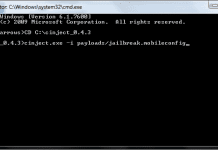
STEP 2: Unzip the folder named cinject_0.4.3 into the system folder, i.e. C:\.

STEP 3: Now go to the start menu, click on run and type in cmd.exe (open command prompt)
ailbreak iPhone 4S & iPad 2 iOS 5.0.1 On Windows With CLI
STEP 4: In the command window, type: CD C:\cinject_0.4.3 as shown to get into the required folder.

STEP 5: You'll now need to execute CLI. Do this by typing: cinject.exe -i payloads/jailbreak.mobileconfig (Press Enter)

ailbreak iPhone 4S & iPad 2 iOS 5.0.1 On Windows With CLI
STEP 6: Now execute cinject.exe -j payloads and wait for the backup.
STEP 7: Finally execute the command cinject.exe -w.
STEP 8: Get in your device and tap on Absinthe icon to get your jailbreak done in few minutes.
We know that this jailbreak guide is techy and anyone who gonna follow this guide should be aware what he do exactly.

If you don't have good background about that, don't worry, the friendly interface of Windows Greenpoi0n Absinthe should release within few hours.

How to Jailbreak A5 iOS 5.0.1 Absinthe for Windows – Video:

Fix Errors - Jailbreak iPhone 4S & iPad 2 iOS 5.0.1 On Window:

  • Fix FATAL(_LINE_) error, go to Settings > General > Reset > Erase All Content And Settings. Then do the procedure all over again.
  • Fix 1266 Fatal Error
  • Fix Camera Roll error, use this guide posted here.
  • Fix error establishing database connection, use the guide posted here.
  • For Mac users who want to use GreenPois0n Absinthe jailbreak tool, a Mac OS X version is currently available. You can follow our guide posted here to jailbreak iPhone 4S, iPad 2 untethered.

Fix 1266 Fatal Error - Jailbreak iPhone 4s Windows

Fix 1266 Fatal Error - Jailbreak iPhone 4s
How to Fix 1266 Fetal error on Windows Jailbreak iPhone 4s on iOS 5.0.1 with Cinjict Jailbreak windows Software.
Running into a problem. When I run the:
cinject -i payloads/jailbreak.mobileconfig
It goes through the script and then I get an error message at the bottom:
recv: Bad File Discriptor
FATAL(–LINE–): Assertion Failed (1266): got = = sizeof(Size)1266


If i continue and use the
cinject -j payloads
cinject -w
it runs through the rest of the script but never reboots and does not jailbreak…any suggestions.


Fix 1266 Fatal Error Answer:

I was initially getting error 1266 as a lot of people.
As suggested by other users, I backed my phone up using iTunes.
First Remove any Passcode for iPhone
Once that was done, I went to my phone Settings –> General –> Reset –> Erase All Content and Settings.

The phone reboots and you have to go through the activation etc, it’s basically a new phone. Connect it up to your PC using the USB and follow the steps to Jailbreak your device.
The backup created by the Jailbreak should take a few seconds (the phone has been reset and is therefore empty) and you should not encounter any errors.

Once that was done, I disconnected the USB cable and went and launched Cydia and let it do its initial setup.

I then launched iTunes, plugged in my iPhone and was prompted with the page of “Set up iPhone as new” or “Restore from backup.”

Select the backup you created earlier, let it restore, and you are now running a successfully Jailbroken iPhone with all of your content !  We hope you would be satisfied with this tutorial ?

Fix Camera Roll Error iPhone 4S & iPad 2 - Absinthe Greenpois0n

Fix Camera Roll Error on iPhone 4S Untethered AbsintheFix camera roll error on iPhone 4S & iPad 2 when jailbreaking 5.0.1 untethered with Absinthe Greenpois0n.

The Dream Team (Pod2g, P0sixninja and MuscleNerd) released Absinthe Greenpois0n jailbreak to bring 5.0.1 untethered jailbreak for iPhone 4S and iPad 2.

Some users have reported that camera roll is empty when jailbreaking iPhone 4S & iPad 2 on 5.0.1 with Absinthe Greenpois0n.


Fix Camera Roll Error iPhone 4S & iPad 2

Fix Camera Roll Error on iPhone 4S Untethered Absinthe
This is not an error in the application it's just an uncompleted jailbreak. To fix “Camera Roll” error you have to rerun the app once to fix, then another time to complete jailbreak.

iPhone 4S Jailbreak iOS 5.0.1 Untethered - [Video]

iPhone 4S JailbreakWe are not too far off now from a public release of an untethered jailbreak for both iPhone 4S and iPad 2.

Pod2g, who is the genius behind this iOS 5 exploit for both A4 and A5 devices, has posted a video on his blog which shows jailbroken iPhone 4S running Cydia, on iOS 5.0.1 - fully untethered jailbreak.


Pod2g says: 
My friend @DHowett made a video of an untethered 4S iPhone 4,1 running iOS 5.0.1 some days ago.@DHowett is a famous iOS developer and a member of the Chronic Dev Team. Only a few to wait now.

iPhone 4S Jailbreak - Untethered - See The Video


Today, a member of the so called “Dream Team”, the legendary iPhone hacker PlanetBeing, tweeted out some more progress on A5 jailbreak (for iPhone 4S and iPad 2), confirming unsigned code running successfully on his iPhone 4S.

@planetbeing: Finally got unsigned code running on my 4S with the stuff that will go into the new jailbreak! 
iPhone 4S Jailbreak

While there is still no official ETA from either of the Dev-Teams for this most awaited jailbreak in recent times, but if the “hint” in Pod2g’s blog post is anything to go by, it is only a matter of few more days now before we can all get our hands on jailbreak for both iPhone 4S and iPad 2.

In the meantime, if you still haven’t upgraded your iPhone 4S or iPad 2 to iOS 5.0.1 yet, it is highly advisable to do so now as Corona untethered jailbreak exploit has been reportedly patched by Apple in the latest iOS 5.1 Beta.

You MUST upgrade your device to final version of iOS 5.0.1 now before iOS 5.1 is released to public. This is important because once final version of IOS 5.1 is out, you wont be able to downgrade your device back to iOS 5.0.1 and hence will be out of luck for any jailbreak until the next one pops out.
Just follow UnlockBoot and be first with jailbroken iPhone 4S and iPad 2 .

iPad 2 Untethered Jailbreak Successfully On iOS 5.0.1

iPad 2 Untethered JailbreakMy blog readers who waiting for the release of the iPad 2 and iPhone 4S untethered iOS 5.0.1 jailbreak can breathe a tiny sigh of relief this evening, knowing that the time scales are shortening, and a public release approaching.


We still haven’t had the green light from any of the developers involved that the jailbreak is ready for prime time, but with every blog and Twitter update.


Updates from the French iOS security researcher have included a video which shows the iPhone 4S running iOS 5.0.1 with an untethered jailbreak. The video was taken and supplied by famous developer, and Chronic Dev Team member, Dustin Howett, who is responsible for various utilities including a cross-platform set of development tools designed for managing, developing and deploying iOS software which negates the need for Xcode.

Tonight has brought what is perhaps the shortest blog post in Pod2g’s history, consisting of one uploaded image and four words. Although lacking in content, the latest post is perhaps one of the most informative on his blog, featuring a picture of an iPad 2 with Cydia 1.1.3 running full screen and clearly showing that it is running on iOS 5.0.1. The post is adorned with the words ‘No more to say!’, clearly showing that the net is closing in and a release of this jailbreak could be imminent.
iPad 2 Untethered Jailbreak
iPad 2 Untethered Jailbreak with Cydia 1.1.3 running. I can see my iPad 2 sitting next to me looking lonely and unloved. Hopefully it won’t be long until I can install Cydia onto it and give it the freedom it so thoroughly deserves. If you like to be first with jailbroken iPad 2 - Just follow UnlockBoot.

Sn0wBreeze v2.9.1 Download To Fix Numerous Bugs

n0wBreeze v2.9.1 Download
Two days ago we told you that iH8Snow released a large update for Sn0wBreeze, dubbed Sn0wBreeze v2.9 to Jailbreak almost all iOS devices untethered up to the iOS 5.0.1 firmware.

For most people Sn0wBreeze was a much-welcomed update and worked very well. For a select few individuals trying to Jailbreak the iPhone 3G with the special iPad baseband .


However, errors became present as Sn0wBreeze never flashed the iPad baseband. Thus, iH8Snow has recently tweeted that he has released an update for Sn0wBreeze to version 2.9.1.

n0wBreeze v2.9.1 Download

In Sn0wBreeze v2.9.1 iPhone 3G owners with the special iPad baseband will be glad to know that Sn0wBreeze now correctly applies to iPad baseband during the IPSW customization process.

Download Sn0wBreeze v2.9.1 for Windows ( direct link )

We should have a tutorial for Jailbreaking with Sn0wBreeze v2.9.1 shortly.

Preserve iPhone 4S For Eventually Unlock !

iPhone 4S Unlock PreserveAll iPhone 4S owners hoping for a future unlock should not update to iOS 5.0.1, iPhone 4S and iPad 2 community is desperately waiting for iOS 5.0.1 jalbreak.

The dream team under the supervision of Pod2g is struggling to get iOS 5.0.1 jailbreak as early as possible.


There is another thing, as Apple is going to fix the iOS 5.0.1 jailbreak hole in the next release of iOS 5.1, so users were advised to update to iOS 5.0.1, so that if Apple stopped signing iOS 5.0.1.

Now we have another news for those who want to unlock their iPhone 4S, they should stay on iOS 5.0 to unlock their iPhone 4S. According to iClarified, MuscleNerd confirmed that he is working on unlock for iPhone 4S on iOS 5.0 so the users should stay on iOS 5.
iPhone 4S Unlock Preserve

With the new - upcoming iPhone 4S jailbreak will support iOS 5 and iOS 5.0.1, but unlock for iPhone 4S?
MuscleNerd has confirmed to iClarified that an untethered iPhone 4S jailbreak for iOS 5.0 will be released at the same time as the iOS 5.0.1 jailbreak, or a day or two later. As always, for those looking to unlock, it is standard operating procedure to stay at the lowest possible baseband.
Stay turned, follow unlockboot - share this post help and help to all iphone 4s owners !

Jailbreak iOS 5.0.1 With Sn0wbreeze 2.9 Download Now

Jailbreak iOS 5.0.1 With Sn0wbreeze 2.9If you running iOS 5.0.1 you can now enjoy the freedom of an untethered jailbreak 5.0.1 using the exploit.

A tethered break has been available pretty much from day one through both Sn0wbreeze and of course, Redsn0w, and although the SemiTether patch gave jailbreak fans a teaser of the full break, we still pined for the day of a fully-untethered exploit which is now upon us.


Pod2g’s progress only applies to devices running on the older A4 chip and older; so the original iPad, iPhone 4, iPhone 3GS and iPod touch. Many users will have clung to iOS 4.3.3 or previous to enjoy the untethered loveliness laid on by Comex or the Chronic Dev-Team, but now those users can take the willful leap of faith and join the millions of others running the fruit company’s latest mobile OS complete with Notification Center amongst over 200 new features.

Jailbreak iOS 5.0.1 With Sn0wbreeze 2.9
Sn0wbreeze is the popular Windows-only jailbreak utility for creating custom iOS firmware with preserved basebands, has now been updated to jailbreak untethered, so the tiresome rigmarole of connecting and kicking your device into a tethered state at every reboot is just a distant memory. Well, at least until the next significant iOS release! You can follow the steps posted here on how to jailbreak iOS 5.0.1 untethered using Sn0wbreeze, the steps are exactly the same except use iOS 5.0.1 IPSW where necessary and the latest version of Sn0wbreeze.

On the eve of it’s two-year anniversary, Sn0wbreeze, the popular Windows-only jailbreak utility for creating custom iOS firmware with preserved basebands, has now been updated to jailbreak untethered, so the tiresome rigmarole of connecting and kicking your device into a tethered state at every reboot is just a distant memory.

If you running an A5 device – the iPhone 4S or iPad 2 – will have to wait a little longer to see a jailbreak in any form. Ultimately, users of both the newer and more powerful gadgets are being punished for power and performance, and are proving quite difficult for the modders and dev teams to infiltrate. But recently, a lot of progress has been made on the A5 front and it seems like now it wont be too long before we can all have full untethered jailbreak for both iPhone 4S and iPad 2, running iOS 5.0.1.

Download Sn0wbreeze 2.9 for Windows

Fix Configuration Error iBooks 5.0.1 Untethered Jailbreak

fix iBooks Configuration Error after 5.0.1 untethered jailbreakHow to Fix iBooks Configuration Error after Untethered 5.0.1 Jailbreak on iPhone and iPad ?

Well, MuscleNerd of iPhone Dev-team has just announced today about the release of Redsn0w 0.9.10 b4 to fix iBooks issue after 5.0.1 untethered jailbreak.

Dev-team was managed to merge Corona 1.0-5 into Redsn0w 0.9.10 b4


The b4 version of redsn0w incorporates the 5.0.1 fix for iBooks, and also for sporadic problems with launchctl. Thanks to @xvolks for merging the iBooks (sandbox) fix from @comex’s github into the overall corona untether from @pod2g! As usual, you can choose to install the fix either by re-running redsn0w over your existing jailbreak (de-select Cydia if you do that), or by installing the corona package from Cydia (it’s the same set of files no matter which way you choose).TIP: If auto-detection fails and redsn0w tells you no identifying data was found, you can always pre-select the appropriate 5.0.1 IPSW using “Extras->Select IPSW”. 

If you see iBooks error message Configuration Error , there is a problem with the configuration of your iPhone. Please restore with iTunes or redo unload iBooks". So if you got this message, don't worry, follow the steps in this tutorial to fix this error.

Fix iBooks Configuration Error after 5.0.1 untethered jailbreak - Via Redsn0w:

Fix iBooks error Requirements:
Follow the steps to fix iBooks issue with Redsn0w 0.9.10 b4:

Step 1: Connect your iDevice with your PC via USB

Step 2: Start Redsn0w 0.9.10 b4, and press on "Jailbreak" button
fix iBooks Configuration Error after 5.0.1 untethered jailbreak
Step 3: Now unselect “Install Cydia” and click “Next”. 
fix iBooks Configuration Error after 5.0.1 untethered jailbreak

Step 4: Now make sure your device is both OFF and PLUGGED IN to the computer before you click “Next”.

Step 5: Wait a few minutes until redsn0w 0.9.10 b4 fixes all issues. iBook Fix is Done !

Fix iBooks Configuration Error after 5.0.1 untethered jailbreak - Corona 1.0-5 Method :

Open Cydia and search for "Corona 5.0.1 Untether", you will found it under the BigBoss repo for free. Install it. And now congratulations, it has fixed iBokos issue after 5.0.1 untethered jailbreak. We hope you would be satisfied with this tutorial ?

3G Unrestrictor Gets Updated for iOS 5.x Download iOS 6.x

3G Unrestrictor Download Free

3G Unrestrictor app has been updated for iOS 5.x / 6.x adding support for the iPhone 4S and iPad 2.

3G Unrestrictor allows you to go around the iPhone's limitations and restrictions of not being able to use some applications like FaceTime, iCloud Backup, Photo Stream or high quality YouTube videos while on a mobile internet connection like 3G or EDGE.

It allows those things by tricking applications into believing they are on WiFi, even though they are on 3G or EDGE.

Download Redsn0w 0.9.10b4 iBooks Fix and Launchctl Error

Download Redsn0w 0.9.10b4iPhone Dev Team has updated their redsn0w tool to version 0.9.10b4 that addresses the critical iBooks crashing bug.
The latest Redsn0w jailbreak also fixes sporadic issues with launchctl.

It is therefore highly recommended to install redsn0w 0.9.10b4 over redsn0w 0.9.10b3 or update Corona 5.0.1 untether to 1.0-4.


The root cause of iBooks issue fix was first identified by @xvolks who earlier patched the kernel sandbox by including @comex sandbox patches into the Corona GIT.


Last week @xvolks released a standalone tweak xBooks hat completely fixed the iBooks error on iPhone 4, 3GS, iPad and iPod touch. But then later he handed over the hack to Musclenerd and Chronic Dev team to package into Corona and Redsn0w 0.9.10b4

Download Redsn0w 0.9.10b4

If you have already jailbroken your iPhone, iPad or iPod touch on iOS 5.0.1 using redsn0w, just re-run the latest version of redsn0w (download links below) in jailbreak mode or run corona 1.0-4 over your existing jailbreak. New jailbreakers, should use redsn0w 0.9.10b4 for clean untethered iOS 5.0.1 jailbreak iPhone 4, iPhone 3GS, iPod touch 4G, 3G and iPad 1G.

You’ll need to remove it and reinstall iBooks, in case you have already installed xBooks tweak on your jailbroken iOS device for iBooks fix. Make sure you de-select “Install Cydia” and do a controlled “slide to power off” shutdown of your device before running redsn0w 0.9.10b4.

How to Jailbreak iOS 5.0.1 and fix iBooks Error

We have already posted a guide which will instruct you to jailbreak your iOS device on latest operating system 5.0.1 using redsn0w 0.9.10b4. Make sure you download the tool from the links posted below tutorial and steps posted here.

Download redsn0w 0.9.10b4 (Direct links)

React0r Unlock 04.11.08 Baseband iPhone 4 is fake ?

React0r Unlock 04.11.08 BasebandWe think that curtains are down finally! Not even a single ounce of my brain believed that React0r unlock for iPhone 4 baseband 04.11.08 was a 100% authentic unlocking solution.

I mentioned it couple of times that it’s not how it works and even today I’m quoting this again that “this is not how it works”. Hamzah Akram managed to create some hype regarding a possible unlocking solution for iPhone 4 baseband 04.11.08 .


But what happened in the end was expected. It’s a fake? I already gave you a pretty condensed history of this scam in my previous take on react0r unlock for iPhone 04.11.08. Today we’ll settle everything down regarding react0r Unlock 04.11.08 baseband on iPhone 4.

The famous iOS developer and iPhone-Dev team’s front man MuscleNerd left a very detailed comment on Hamzah Akram’s blog that how fake that guy’s unlock was and how he managed to pull it off. Here’s what MuscleNerd said:
Sadly, this blog post is one of the many reasons you can tell this guy is a faker (a very bad faker, actually).
By design, CRC’s are designed to detect even the most subtle changes in a file. The CRC of both basebands above is identical: BB35A14A. Despite the time difference in the *file creation times*, the *file contents* are identical. The CRC shows that.
Simple conclusion: this particular faker is missing the most fundamental knowledge of programming. He’s a dumb scammer seeking attention.
This faker’s next move will be to either post a completely unrelated video showing nothing relevant, or saying he’s too busy “working for free” to make a 30-second video.
I really don’t understand what drives these fakers.
This comments elucidates the real story behind this unlock and not only MuscleNerd explained it but Sharif Hashim the person behind Ultrasn0w unlock also posted that this guy is a fake.

He mentioned it in a series of tweets earlier today that he has no link to Hamzah Akram nor he is in any kind of communication with him. Moreover he also condoned MuscleNerd’s comment on Hamzah Akram’s blog.
Unlock 04.11.08 Baseband

Acts like this does not help find any kind of solution to a problem, as a matter of fact such acts demotivate people who work really hard to bring amazing and free unlocking tools for your iPhone. MuscleNerd also said something similar in a follow up comment on the same blog.
Desperate fakers like this guy impede and demotivate progress. Ironic, isn’t it?
Sahrif Hashim is working on an unlock for iPhone 4 which also includes baseband 04.11.08. There is no deadline or exact date of it’s release but it is being worked on.

The best you can do here is wait for the REAL people to come up with some sort of solution for this problem. I personally request you guys to stop helping such people in any way.

Whenever there will be an unlock solution for iPhone 4 baseband 04.11.08 or other baseband which are currently unlocked by Gevey SIM, we will let you guys know. UnlockBoot soon will post full tutorial and description, just follow UnlockBoot and be first who have Unlocked 04.11.08 baseband.

Corona 1.0.4 Untethered Jailbreak has been released

Corona 1.0.4 Untethered JailbreakSaurik has announced that an update to the Corona Untethered Jailbreak has been released in Cydia.

The update fixes issues for iBooks and launchd and it's recommended that users who previously jailbroke their A4 devices install the Corona package from Cydia.

Corona (5.0.1 untether) 1.0-4 is now out: users of redsn0w or the older packages should install. This fixes both iBooks and launchd (again).


Corona 1.0.4 Untethered Jailbreak
Pod2g Says:

Corona 1.0.4 online

@saurik posted version 1.0.4 of Corona in Cydia. Update now ;-)
This fixes both the launchd socket issue (last fix didn't work randomly) and iBooks.
Thanks to @xvolks for the development and @iH8sn0w for the testing.

iPhone 4S & iPad 2 Untethered Jailbreak Progress Update

iPhone 4S & iPad 2 Untethered Jailbreak
iPhone 4S and iPad 2 untethered jailbreak is getting even more close day by day.

Almost all legendary hackers are now working together to bring the first iPhone 4S jailbreak for the jailbreak community.

After 3 months since the iPhone 4S release, hackers are very close now to release an untethered jailbreak solution.


Planetbeing, one of the hackers who has a good history in the jailbreak community. One of his achievements that he could unlock the 2010′s iPhone 4.

Planetbeing has recently announced on his Twitter account that the team could get out of the sandbox with the help of Cydia’s Jay Freeman (known as Saurik).

Today, iPhone expert hacker planetbeing announced that he finally got “unsigned code” running on his iPhone 4S which may be the final step before releasing the untethered jailbreak.
iPhone 4S & iPad 2 Untethered Jailbreak
Will next Sunday be the much-waited Funday? Share your thoughts, and be first with jailbroken iPhone 4s and iPad 2 ! 

iPhone 4S & iPad 2 Jailbreak - Most Amazing Jailbreak

iPhone 4S & iPad 2 Jailbreak
All other Apple users community are desperately waiting for iPhone 4S and iPad 2 jailbreak.

The hackers from the chronic Dev team along with Pod2g, the man behind the untethered jailbreak for A4 and lower devices, are working for the iPhone 4S & iPad 2 untethered jailbreak.


With everyday passing, the jailbreaking scenario is becoming more interesting, and it’s not like only we are excited about this jailbreak, but the dream team also very much dived into it.
iPhone 4S & iPad 2 Jailbreak

Prominent member of Dream Team, p0sixninja aka Joshua Hill tweeted that iPhone 4S / iPad 2 jailbreak is becoming the most amazing one yet. There have been many issues behind this jailbreak such as sandbox, which was eventually solved.

According to the tweets, we can also see that this is the most amazing. We don't know whether the "amazing" word only related to developing section or related to user interface and applying the jailbreak to iDevices section, when iPhone 4S & iPad 2 Jailbreak is released UnlockBoot will upload tutorial for iPhone 4S & iPad 2 Jailbreak.

Sherif Hashim Returns to Unlock 04.11.08 - 02.10.04 BB

04.11.08 Unlock sherif_hashim
Latest post by Sherif has now reignited our hopes on Baseband 04.11.08 and 02.10.04 which are in locked state since ages (however, they can be unlocked using GEVEY sim for which you have to shell out heavy amount, on the other hand, Ultrasn0w is a free SIM unlock), but he has requested his fans not to bug him asking about an ETA about Unlock 04.11.08 or 02.10.04 baseband.

04.11.08 Unlock sherif_hashim


It would be greatly appreciated NOT to post regarding iOS related issues/unlock/...etc , and for those whom are still concerned YES i am still working on the VERY TIGHT bbfw 2.10 - 4.11.08 (i m taking that personal) after my -October 2010 found- vulnerabilities failed to achieve a payload injection vector despite the huge continuos trials and work done by the legendary.

@MuscleNerd, the great everlasting iOS hacker and guru, keeping in mind that there was a 10 months of halt due to the Egyptian revolution :) , what i meant to say is that any new achievements -IF EVER POSSIBLE- regarding this issue will be notified either by this respectable iOS hacker or by the humble myself, NO NEED to ask because it won't make it achievable/earlier/easier. Thanks a lot for taking time to read this. sherif_hashim

He finally concluded that the status will be communicated by either him or Musclenerd, when the ultrasn0w unlock is ready.

As a quick refresher, Sherif Hashim is expert in baseband hacking and have discovered AT+XAPP vulnerability in the modem firmware in past.

This exploit was then used by iPhone Dev Team in ultrasn0w 1.0-1 and 1.2 to unlock the X-Gold 608 basebands 4.26.08, 5.11.07, 5.12.01, 5.13.04 and 6.15.00 (ultrasn0w 1.2 only), and XMM 6180 baseband 1.59.00. UnlockBoot soon will post full tutorial and description, just Follow UnlockBoot and be first who have Unlocked 04.11.08 baseband, Soon we have full description and tutorial !

Unlock 04.11.08 Baseband Status

Unlock 04.11.08 basebandSubject: Unlock 04.11.08 baseband 

Question Posted By : Theo TEnzing    From : Holland
Hello, I accidentally upgraded my iPhone with IOS 5 without preserving baseband. I have the baseband 04.11.08. When do you think there will be a gevey or ultrasn0w  unlock for this baseband ? Can this be a week, month or year?
Thank you in advance .


04.11.08 Unlock Answer :


To Unlock 04.11.08 baseband follow UnlockBoot. There is no Solution for Unlock 04.11.08 Baseband at the time of writing this post .

You can subscribe and follow to get more updates for 04.11.08 Baseband Unlock on iOS 5 iOS 5.0.1 and latest firmware . UnlockBoot soon will post full tutorial and description, just follow UnlockBoot and be first who have Unlocked 04.11.08 baseband, Share this post !

Public Spire Siri Proxies

Public Spire Siri Proxies
Last week chpwn, the well-known figure in the jailbreaking community, launched the first legal port for Siri called Spire.

The download of Spire from Cydia would download approximately 100 megabytes of data from Apple, and would give the entire Siri components into your iDevice, including the GUI and frameworks.
One problem though- it required a Siri proxy - gateway to communicate with Apple servers.


 Spire - which without it, would make Spire useless. Luckily, there have been some people nice enough to lend out their Siri proxy servers for the public.

NOTE that many/all of these servers may be off line due to the high traffic of people wanting access to Siri…do not expect them to work right off the bat.

Spire Proxy - enter these proxies into the Spire Settings app to connect.


https://siri.cd-team.org/
https://192.453.201:3544/
https://97.188.76.85:443/
https://205.185.119.17:2000/

If you Google search for Siri proxies, you WILL run into scams and fakes- many will ask for donations or payments. Though some servers MAYBE legit, it is simply not worth paying up and risking fraud.

Also note that the proxies by which you enter into Spire can receive much of your personal data, including your texts, emails, reminders, your location, etc. Just Share This Post and Get Spire Proxy For Free !

Download iREB R5 / iREB R6 — Upgraded and Fixed

iH8sn0w iREB R5

The popular iOS hacker and jailbreak developer iH8sn0w recently bring up to date his helpful tool iREB 5 with few upgrades and fixes. For anyone that areun-aware, iREB is a popular tool produced by iH8sn0w which help you to put your device to Pwned DFU mode.

iREB can be used to fix iTunes errors like a: Error 1600, 1601, 1602, 1603, 1604 and more errors when you trying to restore your iPhone, iPad or iPod Touch using a custom IPSW firmware.

Unlock 04.11.08 baseband to 01.59.00 iphone 4

Ultrasn0w 04.11.08

What is the unlock via Ultrasn0w 04.11.08 baseband iPhone 4 or downgrade to 01.59.00 possibility? In other words "After upgrading iPhone 4 to iOS 5 no network problem"

One of our readers asked us this question, so that we are going to make this clear in this article. As you know that Apple released iOS 5 for iPhone, iPod touch and iPad on October 12.

Applenberry Work on Unlock 4.11.8 Baseband - Confirmed !!!

A lot of users have been desperately hoping for iPhone 4 baseband 04.11.8 Unlock, and today we are bringing you cheerful news.


Applenberry company, the sole Chinese manufacturer of Gevey SIMs responding to some of the users comments on Facebook, revealed that they are currently working on an unlock for iPhone 4 baseband 04.11.8. According to one comment, we may not get the unlock in the next 30 days, but as soon as the product is finalized, they will announce it on Facebook, Twitter, and on their web site.


In a reply to a user`s question:

- Hello, When we can expect to see new gevey sim for 04,11,08? Thanks.

Applenberry replied saying:

- I can’t promise you that we will have a solution in the next 30 days. The only thing I can tell you is that we are working on it. When the product is ready, it will be announce on facebook, twitter and on our website.

Just Follow UnlockBoot And Be First With Unlocked 04.11.08 Baseband !!!

Run Siri On iPad 2 - Two Photos From MuscleNerd !

Run Siri On iPad 2Do you have iPad 2? Maybe you want install Siri on your iPad ?
Today we search two photography from MuscleNerd FC account.
We don’t know that it is fake or real screenshots. Waiting official news or release from MuscleNerd.


instaled Siri On iPad 2

instaled Siri On iPad 2

We hope that soon we have tutorial and software how to install siri on iPad 2 .
© 2013 UnlockBoot.Com Powered by Blogger | | Privacy Policy | Contact Us / Tip Us!