If you do not want to use Facebook Messenger app to send messages through Facebook, the solution is to install a tweak that is called FBNoNeedMessenger – Available to download from Cydia.
Facebook chat without messenger

Before the installation of the tweak, you need to jailbreak your iPhone first, if your device isn’t jailbroken yet, you can follow our iOS 8.1.2 jailbreak guide.

Install FBNoNeedMessenger Tweak
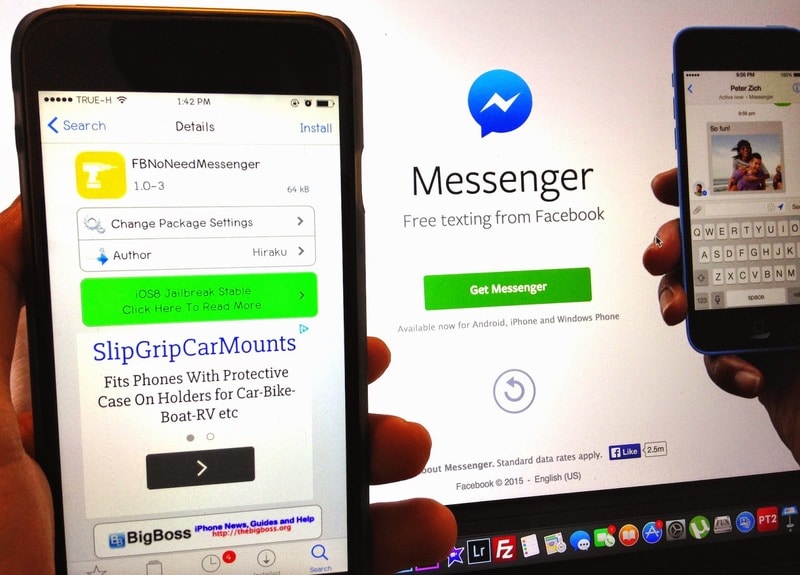
FBNoNeedMessenger tweak

Step to Install FBNoNeedMessenger tweak:

  1. Open Cydia and click Search.
  2. Search for: FBNoNeedMessenger.
  3. Open the FBNoNeedMessenger tweak.
  4. Click Install to instal it.

You’re done. You can now chat directly from the native Facebook app.

Last Updated:
SHARE
Previous articleUnlock iOS 8.1.2 iPhone 6 Plus / 6 / 5s / 5c / 5 / 4s
Next articleDownload & Install AppSync On iOS 8.1.2 / 8.2
Stephan Popov
Stephan Popov is a certified mobile security engineer and the founder of UnlockBoot.com, with over 15 years of experience specializing in iOS software recovery and device unlocking. He provides actionable fixes for common iOS bugs and tools that improve user experience. Stephan conducts in-depth research for every topic covered on this blog to ensure comprehensive, reliable troubleshooting information for Apple and Android users. He holds professional certifications in mobile device repair and security protocols. Connect with Stephan on LinkedIn, X, and Facebook.