

After yesterday's downgrade release of the 06.15.00 baseband for iPhone 3 / 3GS, many users were stuck with the no signal error. So here we are bringing you a solution to fix this problem.
After downgrading the baseband, you can unlock your iPhone 3/3GS, using ultrasn0w on a lower 05.13.04 baseband. The downgrade was implemented in the new redsn0w 09.14b1, and many users tried it.

Many of them faced crashes while applying ultrasn0w and also No Signal error. There is a simple way to fix the No Signal error on iPhone 3/3GS and other crashes as advised by the iPhone Dev Team. They have advised to reinstall Mobile Substrate and ultrasn0w. Here is how to do it with the Cydia package manager.
Fix No Signal Issue On iPhone 3 / 3GS by reinstalling Mobile Substrate and Ultrasn0w
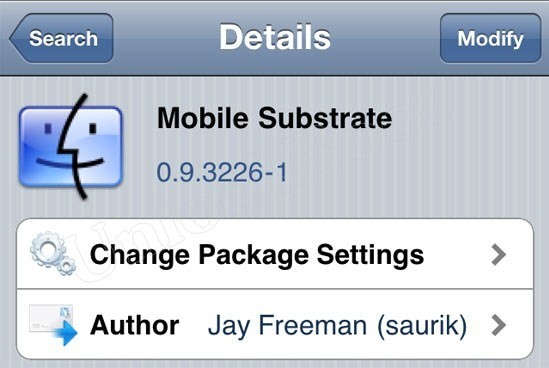
Step 1: Search for Mobile Substrate in Cydia. Start Cydia > Manage > Packages.
![]() |
| Reinstall Mobile Substrate |
Step 2: After you find it, tap on and click Modify located at the top right corner.
Step 3: After clicking Modify, there will be Reinstall, Remove and Cancel. Choose Reinstall.
Step 4: Ok from here wake yourself up! Don't tap Confirm, instead choose Continue Queuing. This is to be done because it allows you to perform more than one re-installation later.
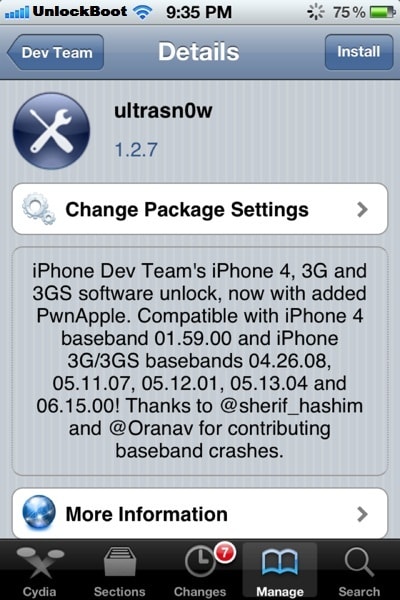
Step 5: Reinstall Ultrasn0w and get rid of No Signal issue on iPhone 3/3GS. Go to Cydia > Manage > Packages and search for ultrasn0w.
![]() |
| Install Latest Ultrasn0w from Cydia |
Step 6: Once Ultrasn0w is found, tap Modify > Reinstall > Confirm and wait for the reinstallation to complete.
Step 7: After the reinstallation of Mobile Substrate and Ultrasn0w, the No Signal issue and other crashing after the downgrade process should be fixed.
Congrats! You have fixed No Signal error on iPhone 3/3GS. Now you can enjoy! Leave your thoughts on how it worked out for you.










83 comments:
doesnt work for my setup / Still have No Service and Searching... I have a 3gs (OldBR) / 6.0.1 jailbroke with redsn0w, 6.15.00 reverted down to 05.13.04... samprefs running alongside and wildcard activated and working perfectly with itunes, ultrasn0w and mobile substrate re-installed over and over agiain... just no signal yet....
I performed the above steps but still have the "No Network" appearing. I have iphone 3gs, baseband 05.13.04 (downgrade from 06.15.00), ios 6. Only one notable thing, I can reboot without using redsnow or connecting to any computer.
oops, got it working now...
@Crahd I have the same problem. What have you done to fix the problem??
oh oh my god i cant believe this thanks lot buddy .. with 6.0.1 downgraded bb 5.13.04 once again thanks a lot guys................................................:):):)
Doesn't work on my 3GS 5.1.1, 5.13.04
wow! thank you it works!
tnx, it works for my iPhone 3gs 6.0.1 06.15.00 , TNXXX
You saved me ^^, thx a lot
thanks for this worked for my 3gs 5.1.1 BB 05.13.04
tears of joy!!!!!!!! hahah thank you so much bro you saved my life,i owe you one
I HAVE DONE WITH ABOVE SUGGESTION ON NO SERVICE BUT STILL NOT GETTING THE SIGNAL
3gs is on ios 6.1 no service even after above suggession
Fantastic. After days of nothing working this method did the trick. Thank you!!!
same here it did not work for me i need a fix i need the unlock to use my 3gs
Follow our guide, make sure you followed all steps.
Enjoy your device and don't forget to spread the world.
doesnt work for my setup / Still have No Service and Searching... I have a 3gs (OldBR) / 6.0.1 jailbroke with redsn0w, 6.15.00 reverted down to 05.13.04... samprefs running alongside and wildcard activated and working perfectly with itunes, ultrasn0w and mobile substrate re-installed over and over agiain... just no signal yet....
It did not work for my 3GS under 5.0.1 - it did not downgrade the baseband and I have no signal now (the fix does not work). It seems the phone does not even see my sim card now. (It does not ask to unlock it)
Good day, nothing poluchaetsya.Set probyval not catch many times already
uninstall ultrasn0w fixer and ultrasn0w 1.2.7, reboot, install ultrasn0w.
will this fix work on iPhone4 bb 1.59.00 "no service issue"?
Yes.
i forgot to mention iOS6.1 , will it work? is it safe to update with preserved baseband?
Yes, it's safe. Use ultrasn0w 1.2.8 - http://www.unlockboot.com/2013/02/ultrasn0w-128-unlock-ios-61-on-iphone-4.html
i have iphone 4s, it doesnt work with my tmobile sim card. i have 6.1 and 3.1.01 firmware. what should i do? =(
Unfortunately, it doesn't work on iPhone 3GS with baseband 6.15.00 on iOS 6.1.
thaank youuu sooo much. i loooove youuu! so this is how it feels when you win a lottery. hehe!
it doesn't work on iPhone 3GS with baseband 6.15.00 on iOS 6.1.
i got the same
thanks.......thanks...you saved me.god bless you.
it worked on my 3gs 6.1 bb 6.15.00. thank you so much. this is the simplest solution that really worked for me. I can't thank you enough.
Guysss...you all must know ultrasn0w 1.2.8 does not support iphone 3gs 06.15 ios 6.1 if your phone is NEW bootrom. Only support OLD bootrom!!!
Thank you.......very much bro..u did it ...All the people just do one thing when u are doing this process just uninstall repo.iparelhos and uninstall all ultrasnow fixer for 6.1..just see one thing that ur iphone3gs is in 6.15.00 baseband ...
i fucking love you dude :X
Dude you are a sweet heart :* loads of love for u :)
Hi Mohammed. does it mean that i can use the steps above even if im in 6.15.00 baseband? thanks
Yes you can do it.just follow the steps carefully..its ok bro...
hi john when u are following these steps u should uninstall ultrasnow fixers 6.XXX.after these u are done...
when u are on 05.13.04 baseband iphone3gs oldBR just do one thing..1.go to cydia,go to manage,add source "repo.iparelhos.com"after adding source just install ultrasnow fixer for 6.0.1 .after that just install ultrasnow then u are done!!!!!!!
Yes.... It works well. After two weeks of attempting other methods. Thank you very much.
not support in old bootrom
how'd you fix it? i have the same problem now..
can somebody please confirm me whether this worked on iPhone4 ios6.1 bb1.59.00 ?
I confirm that this works!!! It's a very long process but it does work for a updated 3GS on 6.1
***If you cant Activate phone after updating to 6.1, you'll first need to do the following:
- Hacktivate: with Redsnow 0.9.14b3 and "downgrade iPad Baseband like above," which will allow you to activate your iphone with a Tethered Jailbreak, (go into General>About and check to see if iphone has baseband: 05.14.04) if not then jailbreak again and downgrade again.
- Then restart Redsnow "must pick ISPW" and do a "Just Boot" then jailbreak until you get "Cydia" (you will have to this step if you cant get into Cydia, because it is tethered jailbreak),
- in Cydia: install "Evasi0n 6.1 Untether" (once installed properly the iphone will be untethered and no longer need Redsn0w.)
- in Cydia: install "Ultrasn0w". You should do a "Complete Update" in Cydia when ever available. Enjoy! You have now unlocked your iPhone to use sim card.
Finally. After days of jailbreaking and many wrong paths and restarts it has worked. Thanks
Uninstalling the ultrasnow fixers then reboot worked like a chark on my 3GS 05.13.04!
Sorry, I meant it worked like a charm*
THANKS SO MUCH! IT WORKS
YOU are my Fucking hero! i have bin working on this on 27 fucking hours im soooo glad thats it finely working corect! how did you now that a Fixer shood Fuck every thing upp and how can i fixer fuck every thing upp !
Love you guys for all your help!
what about for the new bootroms? I have:
-Jailbroken custom IPSW from sn0wbreeze 6.1, BB 5.13.04 (by doing iTunes restore)
upgraded from:
-custom IPSW 4.1 (to preserve baseband)
-followed the instructions above to the letter, reinstalled (Q'd) mobile substrate then reinstalled ultrasn0w 1.2.8.
- I also installed evasi0n for untethered jailbreak for 6.1
- restarted
*still not getting any signal!*
what about for new bootroms on 5.13.04?
try disabling 3G
damnn...it works dude..just uninstall the ultrasn0w fixer and all works :D thanks dude
My IPhone 3GS 5.1.1 BB 06.15.00 when Unlock by ultrasn0w 1.2.8 why still searching Service? How can fix it?
hi i have a IPhone 3GS with iOS 6.1 jailbroken by evasion but i have bb 05.16.08 and i have no signal on the phone any help please?
Thank you, sir. This did fix the problem I faced. I would strongly suggest adding the "remove fixers" step to the main guide, as I fear not everyone is going to be an avid of a comment reader. Cheers.
LOVE YOU TO BITS!
i am facing issue :( my baseband is 06:15:00 and i am using 4.1.. its not upgrading to any other version and also its not getting service is showing no signal :( please helpppp
thx man!!! i try every thing!! but this works!! =)
Kudos -.~ after more than 20 hours of my free time searching for a solution!!!! this really work -.~
Thanks a ton. This solution worked after restarting my iPhone 3GS running 6.1.2 on a baseband 05.13.04. SIM works fine!
dude you are the best!!!
finally i can get back the signal (and recognize the sim) for my 3gs, ios 6.1.2 bb 5.13.04, just unnistalling the damn ultrasn0w fix and follow your intructions...
Thanks a lot!! :D
Country: Chile
Operator: Entel
Nope
Thanks man u did my day Allah yhefdek it wooooooooorks for all operators in Morocco
THANKS!!!! FINALY SOMETHING THAT WORKING FOR ME!! YOU ARE MY HERO! THANKS SO MUCH!!!
YES!! --- uninstall the ultrasn0w fixer and you are good to go!!!
you are a beauty love you saved my asss
It did the trick dude. Thank you soo much. Just a tip for those who still are stuck on no service.
Just unistall the fixers before performing these steps and remove the source as well.
Thanks again. You Rock!
it still shows no service after doing all steps helpp
how can i install cydia? I dont have cydian on my iphone 3gs.
MAN I was looking everywhere to fix no service, EVERYWHERE. I've read every single forum and post, watched (mostly faked movies) and you are the one that've bringed the solution. Thank you!
you are the best you made my day thanks very much!!
it worked for me. :D
make sure you have now sim card in though the process. Thanks Very Much!!!
You need to wait until the new release of ultrasn0w
thanks it worked for me to
THANK YOU VERY VERY VERY MUCH!!!!!!!! I LOVE YOU GUYS!!!!!!!!!!!!
May ALLAH bless U guys.
May ALLAH bless U guys. May Ur brain be full of knowledge. I spent days to unlock and downgrading. Today i make it. i will give this 3gs 32gb to my brother. Thanks
THANK YOU SO MUCH GUYS!!
Oh Hell Yeah!! Thanks A Million!!
Gr8 man ..thank u so much.
Post a Comment