Downgrade iOS 6 to iOS 5.1.1 iPhone 4 Using Redsn0w 0.9.14b2 [Video]
Upgraded to the iOS 6 final version and don't like the experience you are getting? No problem, you can downgrade iOS 6 to iOS 5.1.1 and this guide will tell you how it's done.
All you require is the saved SHSH blobs for iOS 5.1.1 and the latest version of RedSn0w. The SHSH stitching feature to combine the appropriate IPSW file for 5.1.1 will be used. Follow the tutorial.
You will then need to locate the saved iOS 5.1.1 SHSH blobs. Either you should have it on your computer or on Cydia. If it's on your computer, simply place it in the same folder as the 5.1.1 IPSW file. If it's on Cydia then just go ahead with the instructions.
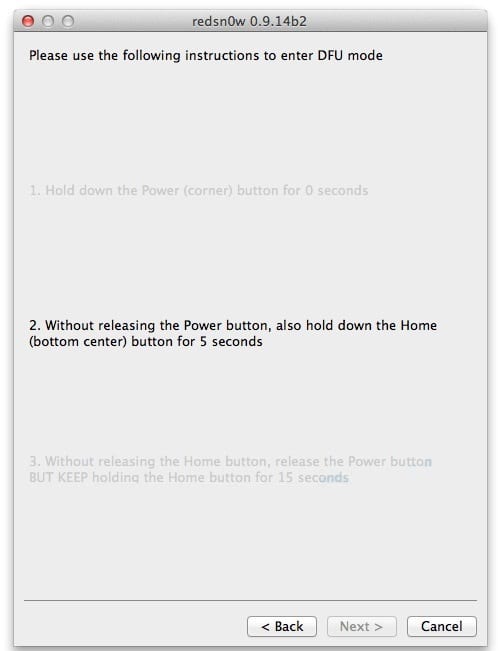
Place your device in the DFU mode.
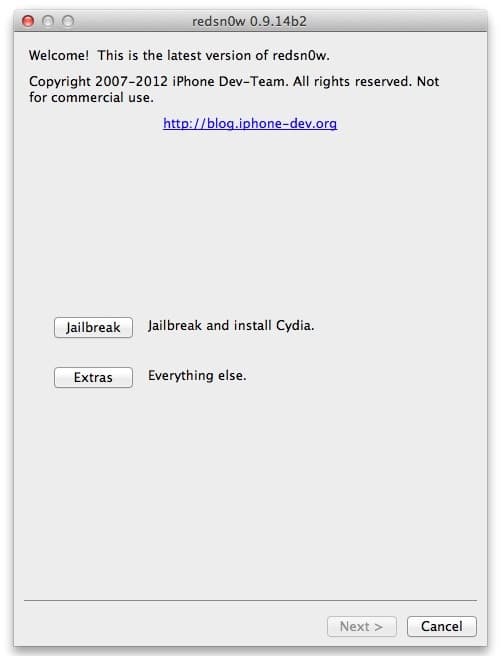
Open RedSn0w, click on extras, then SHSH blobs and then stitch.
Downgrade iOS 6 to iOS 5.1.1 with Redsn0w
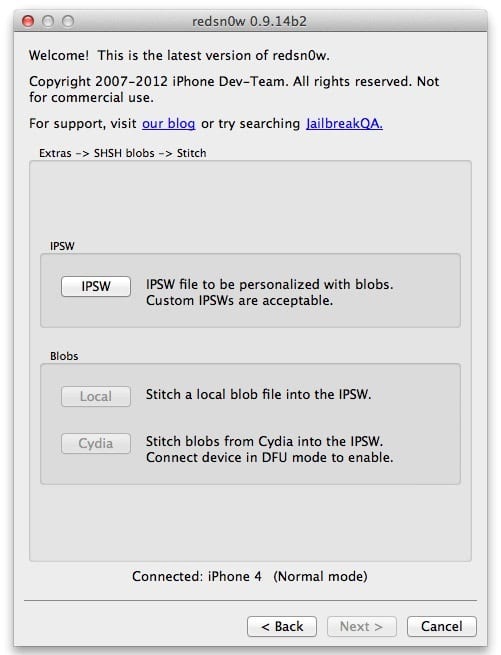
Click IPSW and select the iOS 5.1.1 IPSW for your device.
iOS 6.0 to iOS 5.1.1 Downgrade
If you have your blobs on Cydia, click Cydia in the blobs section, otherwise click on local and select the SHSH blobs for iOS 5.1.1 for the device.
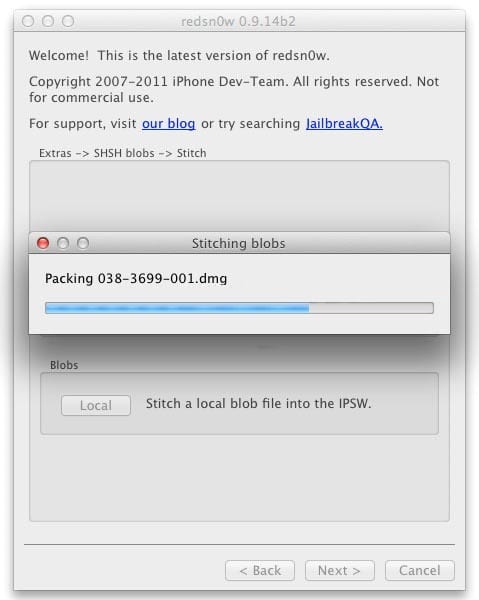
RedSn0w will now stitch them to create a firmware file for iOS 5.1.1. This firmware file can then be used to downgrade even if Apple is has stopped singing iOS 5.1.1.
Redsn0w Stitch SHSH blobs to Downgrade iOS 6.0.1 to 5.1.1
Go back two pages in RedSn0w and click on Pwned DFU; this will place your device in Pwned DFU so that iTunes can restore using the stitched firmware. Skipping this will give you the 1600 error in iTunes.
Pwned DFU Redsn0w iOS 6 to 5.1.1
Open iTunes. Your device should be detected in recovery mode. Hold option and click restore. After that select your stitched firmware file. The filename should have a prefix of 13 numbers which is basically your device's ECID.
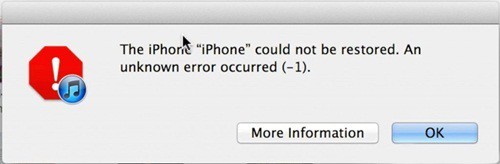
Let iTunes completely restore your device, and if you get an 'error – 1', don't worry that's normal.
iOS 6 downgrade to iOS 5.1.1 iTunes erroer -1
Now open RedSn0w go to extras and click on recovery fix.
Place your device into DFU mode again and the recovery fix should run.
Once the recovery fix is done the device will be restored to iOS 5.1.1.
Follow these steps just the way as they are told, and don't go about trying this if you don't have all the prerequisites. Once again you need the following; an A4 device, saved SHSH blobs, Redsn0W and the IPSW 5.1.1 firmware file for your device. Feel free to ask any questions in the comment section below.

Share the Love:
33
comments:
Tim Johnson
whatis shsh and will this unlock the phone also
Jv
This works people try it.
Jack
can you tell please, how to use it in windows 7 ?
videur
i lost my 5.1.1 shsh blobs please help. can i find it in the internet to download it ? thank you
arks1980
Thanks a lot. It's work perfactly
111
does not work, all the time the recovery mode. dfu don't go
vibes
I did all the steps as you said but in itunes it stuck on "verifying iphone restore with apple" after extracting the software and no restore happened please help.
suck
it workeddd!!!!!!!!!!!!!!!!!!!!!!!!!!!!!!!!!!!!!!!!!!!!!!!!!!!!!!!!!!!!!!!!!!!!!! thankksss have been trying to fix for a week now !
haider
i did all this but my BB is still 4.12.02?? i have shsh bloobs of 5.1.1 wot to do?? any idea?? help plzz!!
pein zilla
I am confused by the second step, I could not find or create SHSH blobs, I'd try it out by using the Tiny Umbrella,but I'm still trouble
Clark
Can I use this guide to downgrade iPhone 4S iOS 6 to 5.1.1 to get my device jailbrokent untethered on iOS 5.1.1? Please help me!
Chitrang Agarwal
i am getting a 3194 error please help me :'(
Jose
Hi I just restore and upgrade To 6.0.1 to get factory unlock and I want to downgrade To 5.1.1 to rejailbreak untethered and I want to know If I will lose my factory unlock if I do downgrade to 5.1.1 if anyone know about this ill apreciate all your help thank you
MK
Is there a way to get your SHSH blobs if you were already jailbroken on ios5.1.1and upgraded to ios6.0.1, because I jailbroke my ipad2 model MC960LL from a another computer and I don't think I saved my SHSH blobs but I have tried several times to retrieve them and cannot.
UnlockBoot
Your shsh blobs can be fetched with redsn0w from cydia or you can use the iSHSHit tool from cydia. Read more here.
UnlockBoot
No. This guide is for Pre-A5 devices.
UnlockBoot
Yes. baseband can't be downgraded.
UnlockBoot
Open cydia adn install iSHSHit -> Save tickets.
UnlockBoot
The same downgrading guide works on Windows.
LamDuongTung
Please, any help? i can't restore my ipod touch 4G. "Error 37 occoured".
Marcelo Yonezawa
Perfect !!!! thank u
haha
Does it work on 4s?
UnlockBoot
No. Just on Pre-A5 devices.
Steve
It worked for me. I was able do downgrade iOS 6.1.1 to iOS 5.1.1 on my iPhone 4 using this guide.
UnlockBoot
SHSH Blobs can be used to downgrade to your device to another iOS firmware. This iOS downgrading method doesn't include unlocking or baseband downgrading.
Kamikadze
u should just click "cydia" and a new software will be created to u.
MsT
I have a iOS 6.1.2 on iPhone 4 ...I wan to downgrade to 5.1.1 it is possible? I can't find that SHSH blobs you specified...I have the IPSW 5.1.1 only...I bough this phone from a guy with 6.1.2
MsT
Me too...after the step with PWNed DFU , it all went wrong...I mean, you said "Hold Option (Alt) and then click Restore" ..I did it and it says It will erase my existing media files and everything, I click Ok...there are some terms of agreement , i agree, and start to download some updates... :| what to do? I have iPhone 4 iOS 6.1.2...Everything till that stept went perfect.
MsT
For ALL ! This tutorial works ONLY on devices with baseband 4.10.x or LOWER ! so check your baseband !
Phoebus Febus
hello, I have an Iphone 4s running on ios 6.1.2. and will re-install this version, itunes not let me do this with his famous error 3194! or downgrade to ios 5.1.1. have you some idea how to realize one of this?! please step by step... thanks in advance from me, to you, for your hardwork for all us!
Phoebus Febus
what possible on 4s?!
jeramie
i have iphone 3gs, i was upgraded accidentally to 6.1 . then when i turn off my cp is not working, its 6.1 downgrade is available, where can i downlod that 6.1 apps thanks
jeramie
thats my problem to jose, is 6.1 downgrade available?
33 comments:
whatis shsh and will this unlock the phone also
This works people try it.
can you tell please, how to use it in windows 7 ?
i lost my 5.1.1 shsh blobs please help. can i find it in the internet to download it ? thank you
Thanks a lot. It's work perfactly
does not work,
all the time the recovery mode.
dfu don't go
I did all the steps as you said but in itunes it stuck on "verifying iphone restore with apple" after extracting the software and no restore happened please help.
it workeddd!!!!!!!!!!!!!!!!!!!!!!!!!!!!!!!!!!!!!!!!!!!!!!!!!!!!!!!!!!!!!!!!!!!!!! thankksss have been trying to fix for a week now !
i did all this but my BB is still 4.12.02?? i have shsh bloobs of 5.1.1 wot to do?? any idea?? help plzz!!
I am confused by the second step, I could not find or create SHSH blobs,
I'd try it out by using the Tiny Umbrella,but I'm still trouble
Can I use this guide to downgrade iPhone 4S iOS 6 to 5.1.1 to get my device jailbrokent untethered on iOS 5.1.1? Please help me!
i am getting a 3194 error please help me :'(
Hi I just restore and upgrade
To 6.0.1 to get factory unlock and I want to downgrade
To 5.1.1 to rejailbreak untethered and I want to know
If I will lose my factory unlock if I do downgrade to
5.1.1 if anyone know about this ill apreciate all your help thank you
Is there a way to get your SHSH blobs if you were already jailbroken on ios5.1.1and upgraded to ios6.0.1, because I jailbroke my ipad2 model MC960LL from a another computer and I don't think I saved my SHSH blobs but I have tried several times to retrieve them and cannot.
Your shsh blobs can be fetched with redsn0w from cydia or you can use the iSHSHit tool from cydia. Read more here.
No. This guide is for Pre-A5 devices.
Yes. baseband can't be downgraded.
Open cydia adn install iSHSHit -> Save tickets.
The same downgrading guide works on Windows.
Please, any help? i can't restore my ipod touch 4G. "Error 37 occoured".
Perfect !!!! thank u
Does it work on 4s?
No. Just on Pre-A5 devices.
It worked for me. I was able do downgrade iOS 6.1.1 to iOS 5.1.1 on my iPhone 4 using this guide.
SHSH Blobs can be used to downgrade to your device to another iOS firmware. This iOS downgrading method doesn't include unlocking or baseband downgrading.
u should just click "cydia" and a new software will be created to u.
I have a iOS 6.1.2 on iPhone 4 ...I wan to downgrade to 5.1.1 it is possible? I can't find that SHSH blobs you specified...I have the IPSW 5.1.1 only...I bough this phone from a guy with 6.1.2
Me too...after the step with PWNed DFU , it all went wrong...I mean, you said "Hold Option (Alt) and then click Restore" ..I did it and it says It will erase my existing media files and everything, I click Ok...there are some terms of agreement , i agree, and start to download some updates... :| what to do? I have iPhone 4 iOS 6.1.2...Everything till that stept went perfect.
For ALL ! This tutorial works ONLY on devices with baseband 4.10.x or LOWER ! so check your baseband !
hello, I have an Iphone 4s running on ios 6.1.2. and will re-install this version, itunes not let me do this with his famous error 3194! or downgrade to ios 5.1.1. have you some idea how to realize one of this?! please step by step... thanks in advance from me, to you, for your hardwork for all us!
what possible on 4s?!
i have iphone 3gs, i was upgraded accidentally to 6.1 . then when i turn off my cp is not working, its 6.1 downgrade is available, where can i downlod that 6.1 apps thanks
thats my problem to jose, is 6.1 downgrade available?
Post a Comment