

Great news for everyone! Ultrasn0w 1.2.7 has been released by the iPhone Dev Team and can now unlock iOS 5.1.1 firmware with preserved basebands.

Now iOS unlockers can use this official Ultrasn0w tool instead of using the ultrasn0w fixer to unlock iPhone 4 / iPhone 3GS on iOS 5.1.1. It can be used on any firmware as it is backward compatible.
Ultrasn0w 1.2.7 Compatible Basebands
- iPhone 4 baseband 01.59.00
- iPhone 3GS basebands 04.26.08, 05.11.07, 05.12.01, 05.13.04 and 06.15.00.
Users can use Sn0wBreeze if on any of these basebands and can preserve while updating to the latest 5.1.1. The Ultrasn0w 1.2.7 won't unlock iPhone 4 baseband 4.11.08 / 4.12.01 — for more info with regards to unlocking these basebands click here.
How to Unlock iOS 5.1.1 with Ultrasn0w 1.2.7 [Guide]:
Step 1: Use absinthe, redsn0w, Pwnage or Ssn0wbreeze to jailbreak your device on iOS 5.1.1.
Step 2: Open Cydia from the homescreen.
Step 3: Choose Manage tab at the bottom of the screen and select sources.
Step 4: Choose Edit and select Add. Now enter the following repo: repo666.ultrasn0w.com
Now select Add source. Click on Return to Cydia after it has added the source.
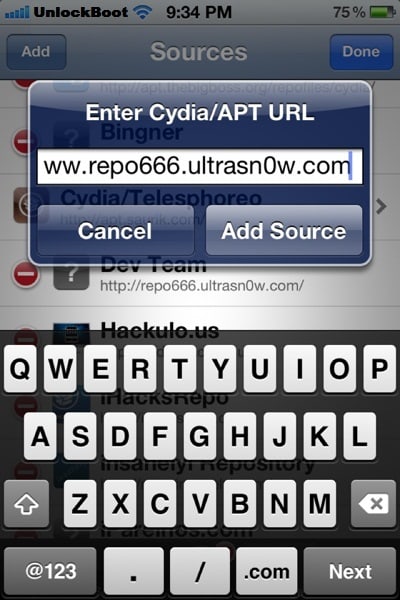
![]() |
| Ultrasn0w 1.2.7 add repo |
Step 5: After installation is complete, find ultrasn0w in Cydia and install it.
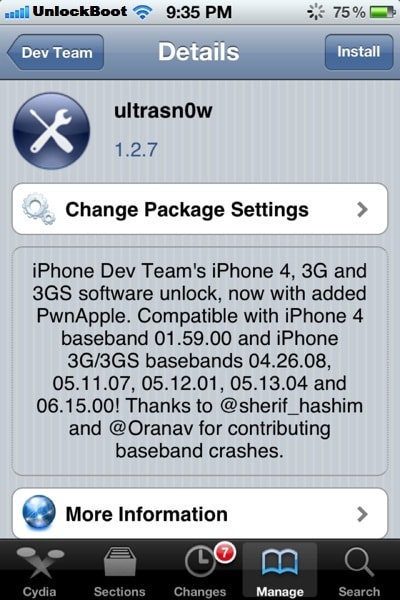
![]() |
| install ultrasn0w 1.2.7 from cydia |
Step 6: The jailbroken iPhone will unlock automatically.
Step 7: In the end, reboot the iPhone with “slide to power off” swipe. Disable 3G mode in Settings > General > Network if you’re a T-Mobile user in USA.
Congrats! Now your iPhone 4 / iPhone 3gs should be unlocked. You can switch between operators as your desire.
On a side note, iPhone 4S iOS 5.1.1 baseband 2.0.12 ( GSM and CDMA versions) can also be unlocked with Gevey Ultra S and R-SIM III Ultra S — for more info visit this page.
Don’t hesitate to ask any questions!










10 comments:
BIG NEWS BIG NEWS (MUST READ )
GUYS FACTORY UNLOCK GOING FOR 25 EMAIL ME MR.CAMPBELL1876@GMAIL.COM JUST 25
ALSO YOU COULD CALL OR TEXT 347-425-4618
PAYMENT THROW PAYPAL (mr.campbell1876@gmail.com)
Thankyou, worked great on my iPhone 3gs ios 6.0 (old bootrom) with 06.15.00 baseband, but had to install Ultrasn0w Fixer for 6.X on cydia first. Then re-install ultrasn0w 1.2.7. Source http://repo.iparelhos.com/, cheers for the info... You have to reset all network setting after this though, Settings, General, Reset, Reset Network Settings. Then I removed the http://unlockit.co.nz network settings package for Optus Pre-Paid settings. Then re-booted phone a few times, first time had no Data service, then it came good. I also noticed in Cydia my phone doesnt have the ios 6.0 SHSH blobs, but the ios 6.0.1 SHSH must support ios 6.0, Thanks again!!!
i had an iphone 4s locked to canadian bell network i use sam and followed all the steps correctly but when i restarted the phone a screen appeared which displayed iphone on it and asked for activation now i can't use my iphone please help...
How to know the phone is unlocked or not?
hi ...i have recently unlocked my iphone 3gs, ios 4.1 and baseband 06.15.00.... how to upgrade ios with the latest version ??
my 3gs 6.1.2 baseband 6.15 still shows no service..
any luck with 04.12.05
Could do with some help please with unlocking iPhone 4 on bandwidth 4.12.05 running on 6.1.3 I have jailbroke my phone now have cydia and have installed ultrasn0w plus the ultrasn0w fixer 6.1 but still no joy with upswing a different sim server I just get no signel I have changed the setting in the mobile dater for the server that I will be useing but still no luck just get no service I dose not say inactive sim any more but still can not use due no service so can't activate sim? Dose anyone have a good idea what to do? Any help will be great :-)
I installed ios 5.1.1 and downgraded baseband from 6.15.00 to 5.13.04 using redsnow 0.9.15 b3 and followed all the step you descired but m still getting the no service problem, please help
Jailbroke my iPhone 3Gs , RedSn0w'd it to BaseBand 05.13.04 still @ 6.1.3 Firmware
installed UltraSn0w + Fixer, nothing
Reinstalled Mobile Subtrate + UltraSn0w .... Nothing...
reboot and removed Fixer and Reinstalled UltraSn0w.....Nothing
Please help?
Post a Comment