Recently Apple announced a new iOS firmware version for the iPhone, iPad and iPod touch – iOS 5.1. The software update is already available for download on all the supported gadgets.

Now we have a direct download link for iOS 5.1.
Among the notable innovations, as expected, the Japanese language support for Siri (availability may be limited in the initial stages of the service), an improved fast access to the camera (the icon is now always visible on your lock screen), you can delete photos from the “photostream”.
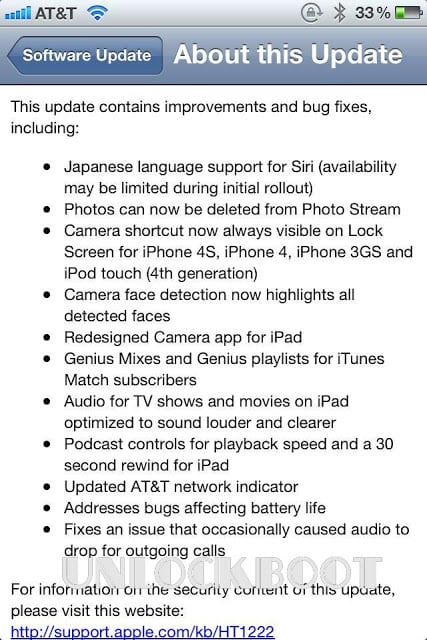
iOS 5.1 update contains many improvements and bug fixes:
- Japanese language support for Siri;
- Photos can be removed from the photostream;
- Camera shortcut is always visible when the screen is locked;
- Function of the camera “Face Recognition” now selects all detected faces;
- Recycling Program “Camera” for iPad;
- Genius Mixes and Genius playlists for subscribers iTunes Match;
- Audio to TV shows and movies on the iPad is optimized for a loud and clear sound;
- Controls the speed of playback and 30-second rewind for the iPad;
- Correction of errors related to the time of the battery life;
- Fix a bug – occasionally leads to loss of audio during incoming calls.
Download official iOS 5.1 firmware for iPhone, iPad, and iPod touch:
TO download iOS 5.1 navigate to our download section
The developers from the iPhone Dev Team strongly recommend anyone who expects to jailbreak must stay on iOS 5.0.1. This is especially for iPhone 4S owners after the iOS 5.1 release, downgrade to a previous iOS version is not possible. If you are waiting for 04.11.08 Unlock – Don’t Update To iOS 5.1. However, you can use factory unlock service to unlock your iPhone 4, 4S and iPhone 5 forever.